Meet
Diagno.
Make a failed command understandable in seconds. Diagno runs your command, diagnoses the failure with fast local checks, falls back to AI only when it has to, and proposes (never silently applies) the smallest safe fix.
Deterministic first. AI only when it has to.
analyzers
See it in action
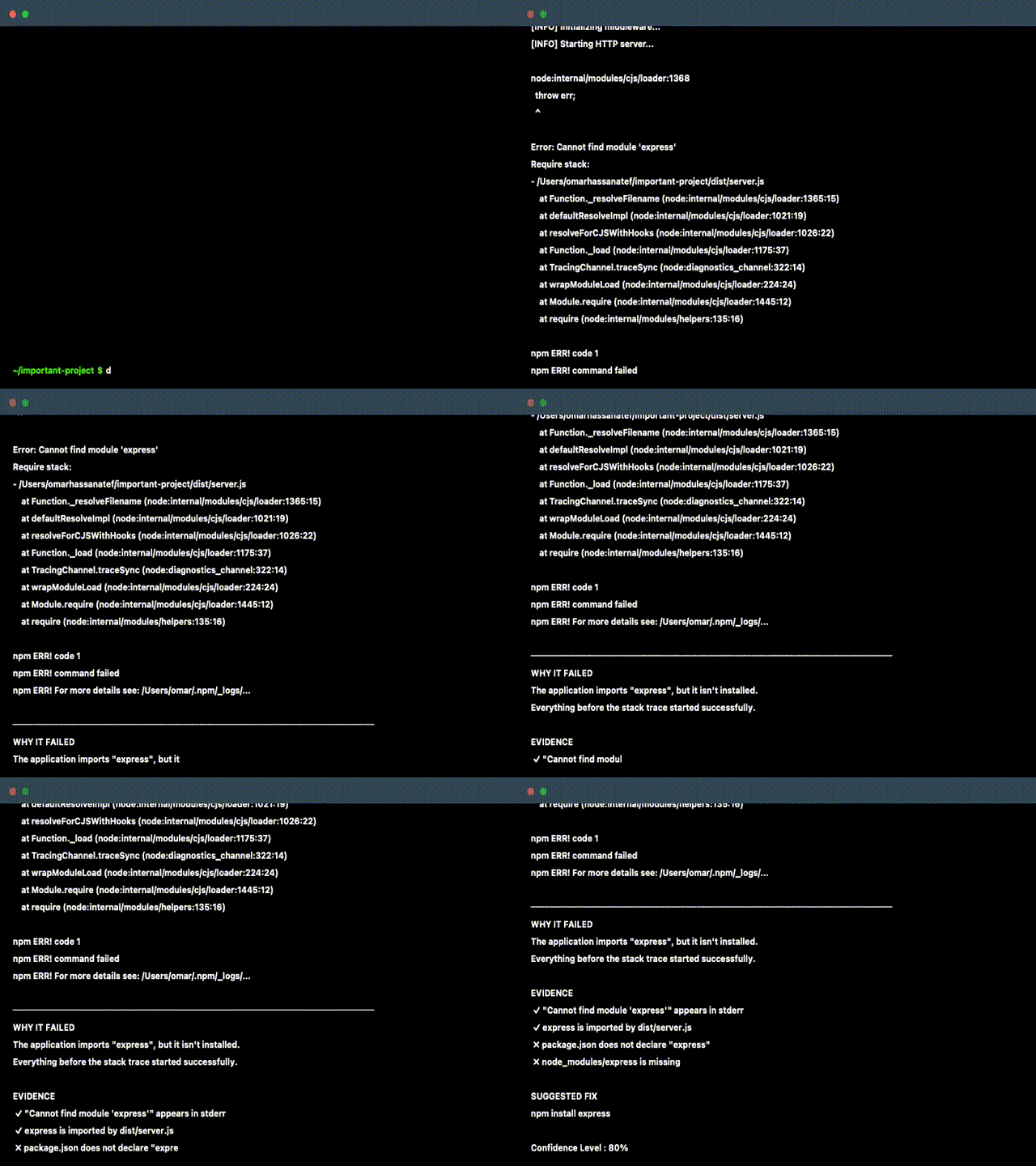
A Node app crashes on start. Instead of a stack trace to decode, Diagno tells you why it failed, shows the evidence, and suggests the fix.
Why Diagno
Most failed commands print everything except the answer: a wall of stack trace, a cryptic exit code, a stderr line that assumes you already know the codebase. Diagno is built on four rules.
-
Diagnose locally first
Deterministic, evidence-backed checks whenever possible. No network call, no API key, no waiting.
-
AI reasons, it doesn't decide
AI only handles cases the checks can't confidently explain, and is always labeled, with facts kept apart from guesses.
-
Never silently modify files
Every fix is shown as a diff and needs your explicit approval before anything is written.
-
Useful without AI
Secrets are redacted and context minimized by default. Diagno explains; it is not an autonomous agent.
How it works
Every run moves through the same pipeline. The AI step is optional and only reached for ambiguous failures.
- Command runner
- Project detector
- Context + secret redaction
- Deterministic analyzers
- AI orchestrator optional
- Fix engine
- Renderer
The deterministic path
Always runs first and is the primary source of truth. Each analyzer produces findings with evidence and a confidence score.
- Fast, offline, no API key needed
- Analyzers run independently; one failing never stops the rest
- Results sorted by confidence
The AI-assisted fallback
Used only when nothing scores above a 70% confidence threshold and an API key is available.
- Sees a small, redacted payload, never your whole repo
- Output is schema-validated; malformed answers are discarded
- Always labeled "AI-assisted, unverified"
- Turn it off entirely with
--no-ai
What it can diagnose
26 deterministic analyzers across six ecosystems. Diagno detects the project from its manifest, so it works from any folder inside it.
Node & TypeScript
- Missing or undeclared dependencies (Node, webpack, Vite, esbuild)
- npm peer dependency conflicts
- Jest path aliases and tsconfig errors
- Node version, lockfiles, env vars, ports, Docker
React
- Invalid hook calls, checking react and react-dom versions on disk
- Unresolved imports from the bundler
- File-watcher limits in dev servers
React Native
- Stale Metro cache
- CocoaPods out of sync or missing
- Android SDK not found, with a one-step
--fix - JDK and Android Gradle plugin mismatches
Ruby on Rails
- Pending migrations, with the exact command to run
- Missing gems and Ruby version mismatches
- Database or Redis not running or not created
- Missing or wrong master key
.NET & C#
- SDK pinned in global.json not installed
- Target framework newer than the SDK
- NuGet restore, package, version and feed errors
- Unresolved types and namespaces
Java & Kotlin
- JDK version mismatches, in plain Java versions
JAVA_HOMEnot set or invalid- Maven and Gradle dependency resolution
- Kotlin JVM target and metadata mismatches
Install
Diagno is published on npm and needs Node.js 18 or later.
From npm
$ npm install -g diagno
Check it works
$ diagno --version
$ diagno --help
Usage
Put diagno in front of any command. It streams the
command's own output live, then adds its diagnosis underneath.
$ diagno npm test
$ diagno npm run build
$ diagno bin/rails test
$ diagno dotnet build
$ diagno ./gradlew assembleDebug
Diagno exits with the same exit code as the command it ran, so
it's safe to drop into scripts and CI:
diagno npm test && echo "ok"
$ diagno npm test
FAIL src/users.test.ts
  Cannot find module '@/modules/users'

✗ npm test (exit code 1, 3.2s)

WHY IT FAILED
Jest cannot resolve the @/* import alias.
tsconfig.json defines it for TypeScript, but
Jest's resolver doesn't read tsconfig paths.

EVIDENCE
 ✓ tsconfig.json defines @/* → src/*
 ✓ failing import uses @/modules/users
 ✗ jest.config.js has no moduleNameMapper

LIKELY FIX
 moduleNameMapper: {
   "^@\/(.*)$": "<rootDir>/src/$1"
 }

Confidence: 96%
Safe fixes with --fix
When Diagno can compute the exact resulting file, --fix
offers to apply it. The flow never skips a step.
-
Validate
Re-reads the file and refuses stale patches.
-
Show a diff
A unified diff, always, even with
--yes. -
Ask first
Nothing happens unless you answer
y. -
Apply atomically
Temp file and rename, so no half-written files.
-
Rerun and verify
Reruns your command before ever saying "fixed".
$ diagno --fix npm test
...
--- jest.config.js	before
+++ jest.config.js	after
 module.exports = {
+  moduleNameMapper: {
+    "^@\/(.*)$": "<rootDir>/src/$1"
+  },
   testEnvironment: "node"
 };

Apply this fix? [y/N] y
Re-running: npm test
✓ Fixed! The original failure no longer reproduces.
Configuration
The AI fallback is optional. To enable it, store an Anthropic API key once instead of exporting it in every shell.
$ diagno config set api-key sk-ant-...
$ diagno config set model <model-id>  # optional
$ diagno config get api-key   # masked
$ diagno config list
$ diagno config unset api-key
$ diagno config path
Stored as JSON at ~/.diagno/config.json with
owner-only permissions.
| Variable | Purpose |
|---|---|
ANTHROPIC_API_KEY |
Enables the AI-assisted fallback. Optional. |
DIAGNO_AI_MODEL |
Overrides the default model. |
Environment variables always override stored config, so CI can inject a key without touching disk.
Privacy by default
Diagno reads as little as it can, and says what it reads.
.env values stay private
Only variable names are collected, never their values.
Secrets are redacted
API keys, tokens, passwords, private keys and JWTs are stripped before anything reaches an AI provider.
Bounded reads
Only a small set of config files are read. Never your whole
repository, never node_modules.
Nothing destructive
No destructive commands, and no AI-suggested commands are ever executed.
CLI reference
Everything Diagno accepts.
| Command | What it does |
|---|---|
diagno <command...> |
Run a command and diagnose a failure |
diagno --json <cmd...> |
Machine-readable JSON output |
diagno --no-ai <cmd...> |
Skip the AI-assisted fallback |
diagno --fix <cmd...> |
Offer to apply the top fix (prompts for approval) |
diagno --fix --yes <cmd...> |
Same, but auto-confirm instead of prompting |
diagno config ... |
Manage stored settings |
diagno --help, -h |
Show help |
diagno --version, -v |
Show the installed version |
Roadmap
Built deliberately, one milestone at a time.
- CLI foundation and command runner
- Deterministic diagnostics: Node, TypeScript, Jest and Docker
- AI orchestrator: redaction, provider abstraction, structured schema
- Fix engine: diffs, explicit approval, atomic apply, rerun
-
Product polish: deeper cross-platform testing,
diagno explain,checkanddoctorcommands - Beyond: GitHub Actions and IDE integrations, local models, Python and Go support
Try it on your next failure
Diagno is free to install from npm. Questions, feedback or ideas for new analyzers? I'd love to hear them.
$ npm install -g diagno